How to Use JJSploit on Windows: Install, Attach and Run Scripts (2026)
Last reviewed: November 2026 | Current version: JJSploit 8.23.4 (per wearedevs.net) | Platform: Windows 10 / 11, Roblox website client only
JJsploit for Windows is a free Roblox Lua script executor for PC. It attaches to the Roblox client process using DLL injection, opens a script editor window, and lets you run Lua scripts inside any Roblox game — no subscription, no paid tier for the core executor.
This guide covers installation, system requirements, file verification, Windows Defender exclusions, a comparison against competing executors, performance tips, error fixes, and a full FAQ. Every step is checked against the official WeAreDevs page and the current build, and we say so where something cannot be confirmed.
Safety Disclaimer: Using a script executor violates Roblox’s Terms of Service. Account bans are a real risk. This guide is for educational and testing purposes. You use JJsploit at your own risk on your own accounts.
How This Guide Was Put Together
The install, attach and error steps below follow the official JJSploit page and forum on wearedevs.net, where WeAreDevs documents the install flow, the antivirus and Visual C++ issues, and the weekly patch cycle. We do not claim private benchmark numbers or script test counts; where community reports differ from the official notes, we say so. Facts that change with each Roblox update (version number, patch timing) are re-checked monthly and dated at the top of the page.
Where behavior varies between Roblox updates, that’s noted explicitly.
What JJsploit for Windows Does
JJsploit is a free Lua executor. It injects a DLL into the Roblox client process, which gives it access to the Lua environment running inside the game. Once attached, you get a text editor where you paste scripts and execute them.
The Windows version is the primary and most capable build. It runs inside a full OS environment with direct access to Windows memory APIs.
What JJsploit does well:
- Runs most common Lua scripts without modification
- Handles basic auto-farm, GUI, and ESP scripts
- Works across a wide range of Roblox games
- Loads fast with a small resource footprint
What it won’t do:
- Run scripts that need advanced functions such as
hookfunctionordecompile(the ones measured by the sUNC tracker) - Bypass Roblox Hyperion/Byfron detection consistently
- Auto-update after Roblox patches (requires manual update or patch wait)
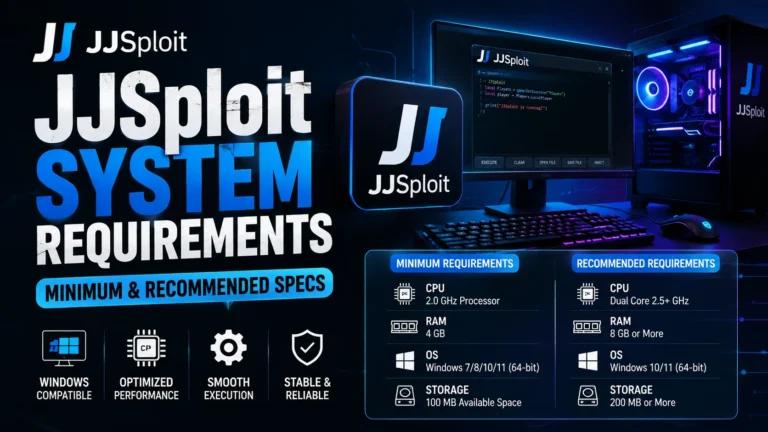
System Requirements
| Requirement | Minimum | Recommended |
|---|---|---|
| OS | Windows 10 64-bit | Windows 11 23H2 |
| RAM | 4 GB | 8 GB |
| Storage | 50 MB free | 100 MB free |
| CPU | Dual-core, 2.0 GHz | Quad-core, 3.0 GHz |
| Roblox | Latest installed version | Latest installed version |
| Visual C++ Runtime | VC++ 2015–2022 Redistributable (x64) | Latest VC++ Redistributable (x64) |
| Internet | Required (for updates) | Stable broadband |
| DirectX | DirectX 11 | DirectX 12 |
The Visual C++ runtime is the most commonly missed. If JJsploit shows a blank crash on launch with no error window, a missing Visual C++ runtime is usually why. Install the latest Microsoft Visual C++ Redistributable (x64) from Microsoft; WeAreDevs suggests it if injection fails.
Which Scripts Work on JJSploit
JJSploit runs the common script types most beginners use: auto-farms, ESP and simple GUI scripts, speed and jump modifications. It is not listed on the public sUNC compatibility tracker (whatexpsare.online), which is the measure serious script authors use, so scripts that depend on advanced functions such as hooking or decompiling can fail or do nothing. If a script errors on JJSploit but runs elsewhere, that is usually why. The old “Level 7 / Level 8” labels still seen on clone sites are not a real measurement; sUNC score is. See the JJSploit alternatives list for how the current executors compare on that scale.
How to Download and Install JJsploit on Windows
Follow these steps in order. Skipping any step is the most common cause of attach failures.
Step 1:
Download from the official source only. Get the file from the official JJsploit website. Third-party mirrors on Discord servers, YouTube descriptions, and file-sharing sites frequently distribute modified builds. Modified builds have been documented to contain keyloggers and RATs (remote access trojans), not just executor code.
Step 2
Verify the file before running. See the File Verification section below for exact steps. This takes 2 minutes and removes the biggest download risk.
Step 3
Run the installer. Double-click the downloaded .exe installer and follow the setup steps.
Step 4
Add a Windows Defender exclusion. Open Windows Security → Virus & threat protection → Manage settings → Add or remove exclusions. Add the entire JJsploit folder. Do this before running the executable for the first time, otherwise Defender may quarantine the DLL before you even see it.
Step 5
Run as administrator. Right-click JJsploit.exe → Run as administrator. DLL injection into another process requires elevated privileges. Without this, attach fails silently or throws an access denied error.
Step 6
Complete the free unlock step (if it appears). JJSploit has no key system. On first launch, a free unlock screen may appear — just follow the instructions on it.
Step 7
Launch Roblox and join a game. Let the game fully load past the loading screen. Wait until you’re spawned in and can move your character.
Step 8
Click Attach. In JJsploit, click the Attach button. The status bar changes. On Windows 11, attachment completes in 5 to 20 seconds. A notification appears in-game when it succeeds.
Step 9
Paste and execute your script. Open the script editor tab, paste your Lua script, and click Execute.
File Verification: How to Confirm Your Download Is Safe
Before running any executor, verify the file hash. A file hash is a unique fingerprint of the file’s contents. If someone modified the file, the hash changes.
On Windows 11/10 (PowerShell):
Get-FileHash "$env:USERPROFILE\Downloads\jjsploit-8.23.4.exe" -Algorithm SHA256WeAreDevs doesn’t publish a hash on its download page, so upload the same file to VirusTotal and read the detection names. Stealer, RAT or miner labels mean you should delete the file.
Additional verification checks:
- The installer should be about 14 MB. Significantly larger files suggest bundled software.
- Right-click the file → Properties → Digital Signatures tab. Legitimate builds may show a signature. Unsigned doesn’t automatically mean fake, but a mismatched signature name is a red flag.
- The download should be a single .exe installer from jjsploits.org or wearedevs.net. A .zip or .rar, or an installer from any other site, is a red flag.
Why Windows Defender Flags JJsploit
Every Roblox executor triggers antivirus alerts. The technical reason: executors use DLL injection to insert code into the Roblox client process (RobloxPlayerBeta.exe). Windows Defender and most third-party AV tools classify DLL injection as suspicious by default, because it’s the same technique real malware uses to hijack processes.
The flag doesn’t confirm the file is malicious. The developer says the official build is clean, though some sandbox reports have flagged official versions. The risk is entirely about which version you downloaded. Modified builds from unofficial sources are the actual threat vector.
Three things to check before trusting any build:
- Hash verified against official source
- Downloaded from the official domain, not a mirror
- The file is a single .exe installer
Roblox-side risk is separate and real. Roblox’s Hyperion anti-cheat (previously Byfron) is a client-side anti-tamper system. It monitors process behavior, memory writes, and API call patterns. Since Hyperion’s expanded rollout in 2023, detection rates for free executors including JJsploit have increased. JJsploit doesn’t guarantee bypass. Bans typically come as either a warning or a permanent account termination depending on what the script did and which game you used it in.
JJSploit vs Other Executors
JJSploit’s advantages are simple: free, no key system, no account, small installer, and WeAreDevs patches it quickly after Roblox updates. Its weakness is script compatibility, where free rivals such as Solara and Velocity and paid tools such as Wave score higher on the sUNC tracker. We keep the full comparison, with prices, key systems and tracker scores checked monthly, in 7 Best JJSploit Alternatives, with head-to-head pages for JJSploit vs Solara and JJSploit vs Delta. Executors that no longer work (KRNL, Synapse X, Fluxus, Script-Ware) are listed there too, so you do not waste time on a dead download.
Performance Tips: Getting JJsploit to Run Better on Windows
These settings reduce crashes, attach failures, and script lag.
Set JJsploit process priority to High. Open Task Manager → Details tab → right-click JJsploit.exe → Set priority → High. This prevents Windows from deprioritizing JJsploit’s memory access operations during script execution.
3. Close background applications before attaching. Discord’s hardware acceleration, browser video tabs, and other injecting tools (game overlays, GeForce Experience) can conflict with DLL injection. Close them before attaching.
4. Run Roblox in a fixed window mode. Full-screen exclusive mode in Roblox occasionally causes attach failures on some GPU drivers. Set Roblox to windowed or borderless windowed in Roblox’s graphics settings.
5. Don’t attach too early. Wait until your character is fully spawned in the game. Attaching during the loading screen or before the Lua environment initializes causes the executor to attach to an incomplete process state.
6. Keep Windows updated separately from Roblox updates. Windows feature updates occasionally change memory access APIs. If JJsploit starts failing after a Windows update (not a Roblox update), check the JJsploit Discord for a compatibility note.
Pros and Cons
| Pros | Cons |
|---|---|
| Completely free, no paid tier | Not on the sUNC tracker; scripts needing advanced functions can fail |
| Small installer (about 14 MB) | Short update lag (usually same day) after Roblox patches |
| Beginner-friendly interface | Byfron bypass not guaranteed |
| No registration required | Free unlock screen may appear on first launch |
| Active development, regular patches | Limited Script Hub compared to competitors |
| Works on Windows 10 and 11 | No built-in auto-attach |
| Large community and documentation | False positive AV flags require manual exclusion |
Common Errors and Fixes
Error: JJsploit Won’t Attach
Cause (most common): Roblox updated and JJsploit’s current build hasn’t been patched yet.
Fix: Wait for a patch. Check the official JJsploit Discord or website for patch status. Forcing attach on a version mismatch does nothing.
Secondary causes and fixes:
| Cause | Fix |
|---|---|
| Not running as administrator | Right-click → Run as administrator |
| Defender deleted the injection DLL | Re-add folder exclusion, reinstall with the latest installer |
| Roblox not fully loaded | Attach only after in-game spawn |
| Another injector running | Close all other injection tools |
| Visual C++ runtime runtime missing/outdated | Install Latest VC++ Redistributable (x64) |
Error: Script Executes But Nothing Happens
The script needs functions JJSploit does not provide. Its Lua environment does not expose hookfunction, decompile, getgenv, or similar calls.
Diagnosis test — paste this:
print("Executor level test: running")
game.Players.LocalPlayer.Character.Humanoid.WalkSpeed = 25
If the print appears in output and walk speed changes, the executor works. The original script is the problem, not JJsploit.
Error: Roblox Crashes on Attach
Usually an outdated JJsploit build against an updated Roblox client. Also happens when multiple injectors run simultaneously.
Fix: Update JJsploit → close all overlays and injection tools → retry.
Error: Free Unlock Screen Won’t Complete
Close JJSploit, check your internet connection, and open it again. If the unlock screen still doesn’t finish, see our JJSploit not working guide.
Error: “Access Denied” on Launch
JJsploit needs administrator rights for process injection.
Fix: Right-click the EXE → Properties → Compatibility tab → check “Run this program as an administrator” → Apply.
How to Uninstall JJsploit
The current JJSploit installer adds a normal Windows uninstall entry. To remove it:
- Close JJsploit if it’s running.
- Open Settings → Apps → Installed apps, find JJSploit and click Uninstall.
- Open Windows Security → Virus & threat protection → Manage settings → Remove the folder exclusion you added during setup.
- Empty the Recycle Bin.
If a JJSploit folder is left behind after uninstalling, you can delete it manually.
Version History and Update Cycle
JJsploit releases patches reactively — meaning after Roblox updates, not on a fixed schedule. Roblox pushes client updates roughly every 1–2 weeks. Each update changes memory addresses and API signatures, which breaks executor attachment until a new patch matches the new addresses.
WeAreDevs says it updates “ASAP” after each Roblox release; in practice the fix has usually arrived within hours to the same day, occasionally longer after a larger Roblox or anti-cheat change. There is no fixed schedule. The current build and the versions we have been able to verify are listed in the version history on the download page, and the status page tracks whether it is working this month.
Check the official JJsploit announcement channel before assuming the executor is broken. Most “JJsploit stopped working” reports are Roblox update timing issues, not executor bugs.
Is There an Android Version?
No. WeAreDevs ships JJsploit for Windows only. There is no official Android, iOS, Mac or Linux build, and any “JJsploit APK” you find is unofficial and should be treated as a fake.